Spring 应用中的外部化配置管理-1
概述
本教程将深入探讨 Spring 框架中外部化配置管理的各个方面,重点关注云原生应用场景。我们将学习如何使用属性(properties)、环境配置(profiles)以及 Spring Boot 和 Spring Cloud Config 实现灵活且可维护的配置。
为什么要外部化配置?
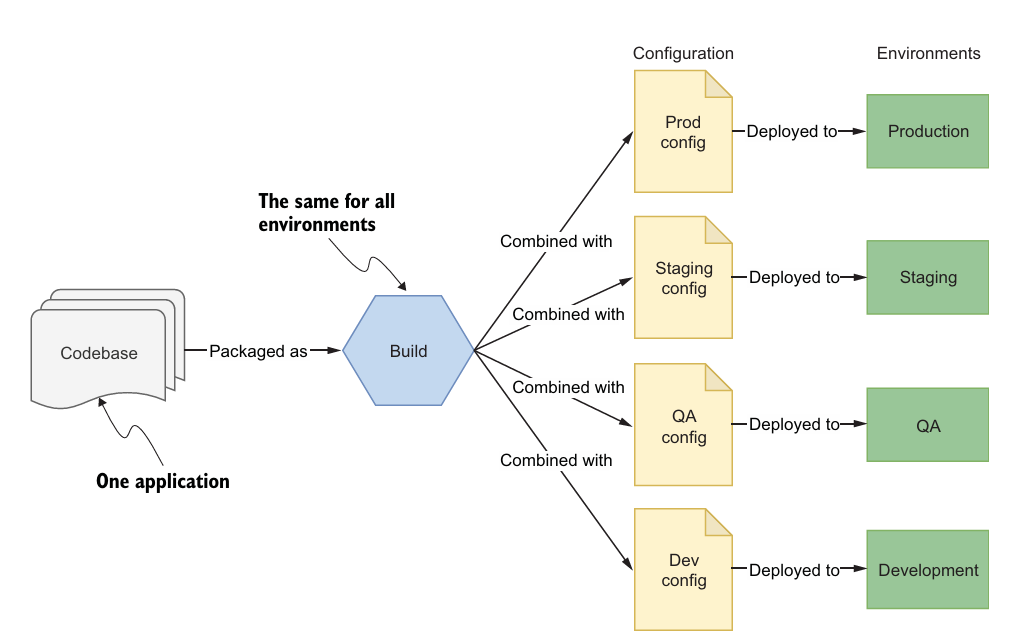
在传统的应用开发中,配置信息通常与源代码捆绑在一起。这种做法存在以下问题:
- 不可变性破坏: 每次更改配置都需要重新构建和部署应用,违背了云原生应用不可变部署的原则。
- 环境耦合: 难以在不同环境(开发、测试、生产等)之间管理配置差异。
- 安全性风险: 将敏感信息(如数据库密码)直接存储在代码库中存在安全隐患。
外部化配置将配置信息从应用程序代码中分离出来,可以带来以下好处:
- 不可变部署: 应用程序包在不同环境中保持不变,只需更改外部配置即可。
- 环境隔离: 可以轻松地为不同环境管理不同的配置。
- 集中管理: 可以使用配置服务器集中管理所有应用程序的配置。
- 安全性增强: 可以使用加密或其他安全机制保护敏感信息。
Spring 中的配置:属性和环境配置
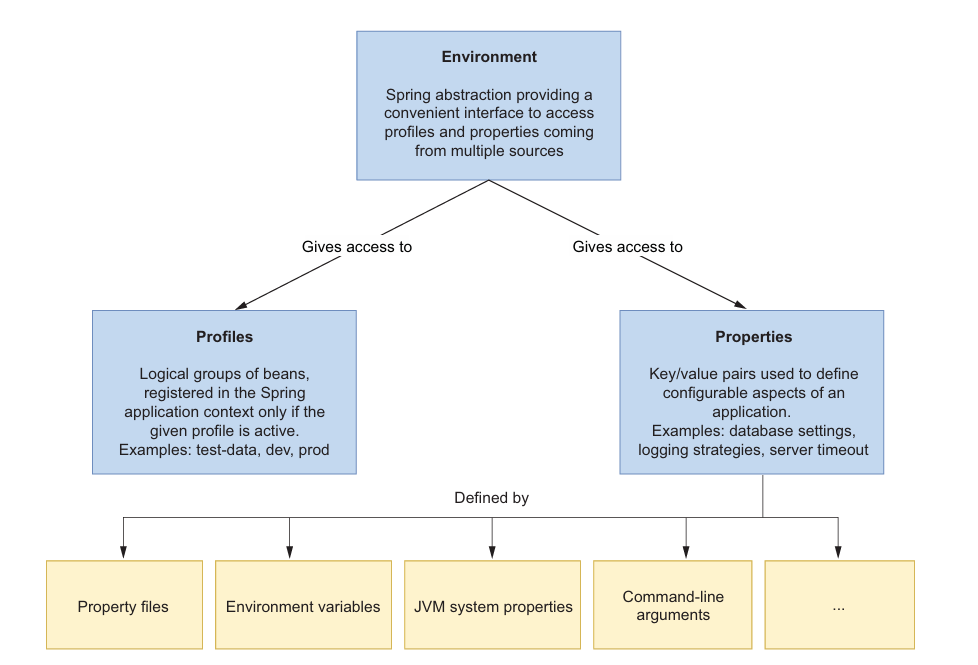
Spring 提供了 Environment 抽象,用于访问任何配置数据,无论其来源如何。Spring 环境的两个关键方面是属性和环境配置。
4.1.1 属性:键值对配置
属性是 Java 中 java.util.Properties 支持的键值对。Spring Boot 会自动从不同来源加载它们。如果同一属性在多个来源中定义,则优先级决定了哪个优先。以下是一些常见属性来源的优先级列表,从最高优先级开始:
- 测试类上的
@TestPropertySource注解 - 命令行参数
- 来自
System.getProperties()的 JVM 系统属性 - 来自
System.getenv()的操作系统环境变量 - 配置文件
@Configuration类上的@PropertySource注解- 来自
SpringApplication.setDefaultProperties的默认属性
配置文件可以进一步优先排序,从最高优先级开始:
- 打包在 JAR 外部的
application-{profile}.properties和application-{profile}.yml文件中的特定于环境配置的应用程序属性 - 打包在 JAR 外部的
application.properties和application.yml文件中的应用程序属性 - 打包在 JAR 内部的
application-{profile}.properties和application-{profile}.yml文件中的特定于环境配置的应用程序属性 - 打包在 JAR 内部的
application.properties和application.yml文件中的应用程序属性
Spring 中属性处理的优点在于,您无需知道特定的属性源即可获取值:Environment 抽象允许您通过统一接口访问任何来源中定义的任何属性。如果同一属性在多个来源中定义,它将返回具有最高优先级的属性。
访问应用程序属性
有几种方法可以从 Java 类访问属性,常用的方法:
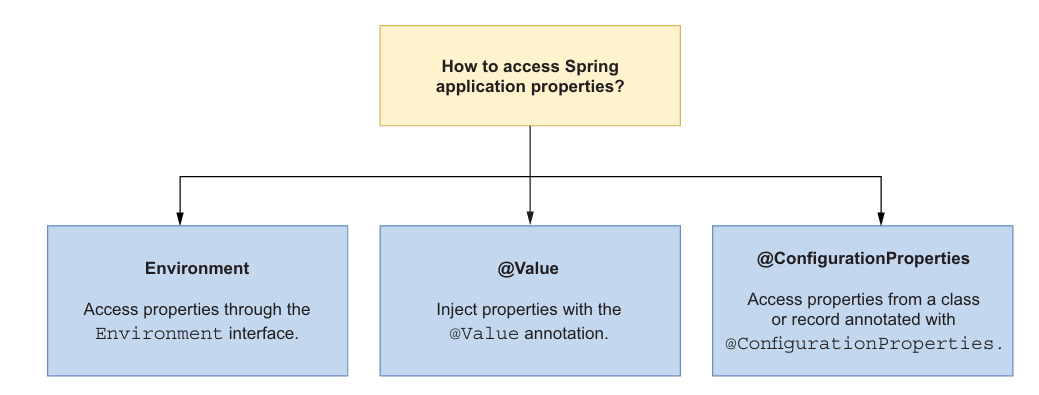
Environment接口:java@Autowired private Environment environment; public String getServerPort() { return environment.getProperty("server.port"); }@Value注解:java@Value("${server.port}") private String serverPort; public String getServerPort() { return serverPort; }@ConfigurationProperties注解 (推荐): 这种方式更加的 robust 和易于维护, 也是 Spring 团队推荐的方式.
定义自定义属性
启用配置属性扫描: 在 Spring Boot 应用程序的主类上添加
@ConfigurationPropertiesScan注解。java// Listing 4.1 Enabling scanning of configuration data beans package com.polarbookshop.catalogservice; import org.springframework.boot.SpringApplication; import org.springframework.boot.autoconfigure.SpringBootApplication; import org.springframework.boot.context.properties.ConfigurationPropertiesScan; @SpringBootApplication @ConfigurationPropertiesScan // 扫描配置数据bean public class CatalogServiceApplication { public static void main(String[] args) { SpringApplication.run(CatalogServiceApplication.class, args); } }创建配置属性类: 创建一个带有
@ConfigurationProperties注解的类,并指定属性前缀。java//Listing 4.2 Defining custom properties in a Spring bean package com.polarbookshop.catalogservice.config; import org.springframework.boot.context.properties.ConfigurationProperties; @ConfigurationProperties(prefix = "polar") // 指定属性前缀为 "polar" public class PolarProperties { /** * A message to welcome users. */ private String greeting; public String getGreeting() { return greeting; } public void setGreeting(String greeting) { this.greeting = greeting; } }(可选) 添加 Spring Boot Configuration Processor 依赖: 在
build.gradle文件中添加以下依赖,以便在构建时生成配置元数据。gradle//Listing 4.3 Adding dependency for the Spring Boot Configuration Processor configurations { compileOnly { extendsFrom annotationProcessor } } dependencies { annotationProcessor 'org.springframework.boot:spring-boot-configuration-processor' }这将在
META-INF/spring-configuration-metadata.json中自动生成元数据。IDE 可以利用它们,显示每个属性的描述信息,并帮助您自动完成和类型检查。在
application.yml或application.properties中定义属性值:yaml#Listing 4.4 Defining a value for a custom property in Catalog Service polar: greeting: Welcome to the local book catalog!使用自定义属性: 通过构造函数注入或其他方式注入配置属性 bean,并使用其 getter 方法访问属性值。
java//Listing 4.5 Using custom properties from a configuration properties bean package com.polarbookshop.catalogservice; import com.polarbookshop.catalogservice.config.PolarProperties; import org.springframework.web.bind.annotation.GetMapping; import org.springframework.web.bind.annotation.RestController; @RestController public class HomeController { private final PolarProperties polarProperties; public HomeController(PolarProperties polarProperties) { this.polarProperties = polarProperties; } @GetMapping("/") public String getGreeting() { return polarProperties.getGreeting(); // 使用自定义属性 } }
4.1.2 环境配置:功能标志和配置组
环境配置(Profiles)是仅当指定的环境配置处于活动状态时才加载到 Spring 上下文中的 bean 的逻辑组。Spring Boot 还将此概念扩展到属性文件,允许您定义仅当特定环境配置处于活动状态时才加载的配置数据组。
您可以同时激活零个、一个或多个环境配置。未分配给环境配置的所有 bean 将始终被激活。分配给默认环境配置的 Bean 仅在没有其他环境配置处于活动状态时才被激活。
将环境配置用作功能标志 环境配置的第一个用例是仅当指定的环境配置处于活动状态时才加载 bean 组。部署环境不应过多地影响分组背后的原因。一个常见的错误是使用像 dev 或 prod 这样的环境配置来有条件地加载 bean。
建议在将环境配置与要按条件加载的 bean 组关联时将环境配置用作功能标志。考虑环境配置提供的功能,并相应地命名它,而不是考虑将在哪里启用它。
//Listing 4.6 Loading book test data when the testdata profile is active
package com.polarbookshop.catalogservice.demo;

import com.polarbookshop.catalogservice.domain.Book;
import com.polarbookshop.catalogservice.domain.BookRepository;
import org.springframework.boot.context.event.ApplicationReadyEvent;
import org.springframework.context.annotation.Profile;
import org.springframework.context.event.EventListener;
import org.springframework.stereotype.Component;

@Component
@Profile("testdata") // 仅当 "testdata" 环境配置处于活动状态时才加载此类
public class BookDataLoader {

    private final BookRepository bookRepository;

    public BookDataLoader(BookRepository bookRepository) {
        this.bookRepository = bookRepository;
    }

    @EventListener(ApplicationReadyEvent.class)
    public void loadBookTestData() {
        var book1 = new Book("1234567891", "Northern Lights", "Lyra Silverstar", 9.90);
        var book2 = new Book("1234567892", "Polar Journey", "Iorek Polarson", 12.90);
        bookRepository.save(book1);
        bookRepository.save(book2);
    }
}
在开发环境中激活环境配置:
//Listing 4.7 Defining the active profiles for the development environment
bootRun {
    systemProperty 'spring.profiles.active', 'testdata'
}
命令行执行命令:
./gradlew bootRun执行该命令后,查看日志:
...Starting CatalogServiceApplication using Java 17
The following 1 profile is active: "testdata"
然后,可以请求:
http :9001/books就可以看到测试数据.
将环境配置用作配置组
Spring Framework 的环境配置功能允许您仅在给定的环境配置处于活动状态时注册一些 bean。同样,Spring Boot 允许您定义仅当特定环境配置处于活动状态时才加载的配置数据。一种常见的方法是在以环境配置为后缀命名的属性文件中。
在属性文件的上下文中,环境配置用于对配置数据进行分组,并且可以将它们映射到部署环境,而不会面临与将环境配置用作功能标志时相同的问题。但这仅适用于您不将特定于环境配置的属性文件与应用程序打包在一起的情况。15-Factor 方法论建议不要将配置值分批放入以环境命名并与应用程序源代码捆绑在一起的组中,因为它无法扩展。
总结
本节介绍了Spring中外部化配置的基本概念和操作, 主要介绍了属性和环境配置, 并且演示了如何定义和使用自定义属性, 以及如何通过环境配置来控制bean的加载和配置文件的加载.